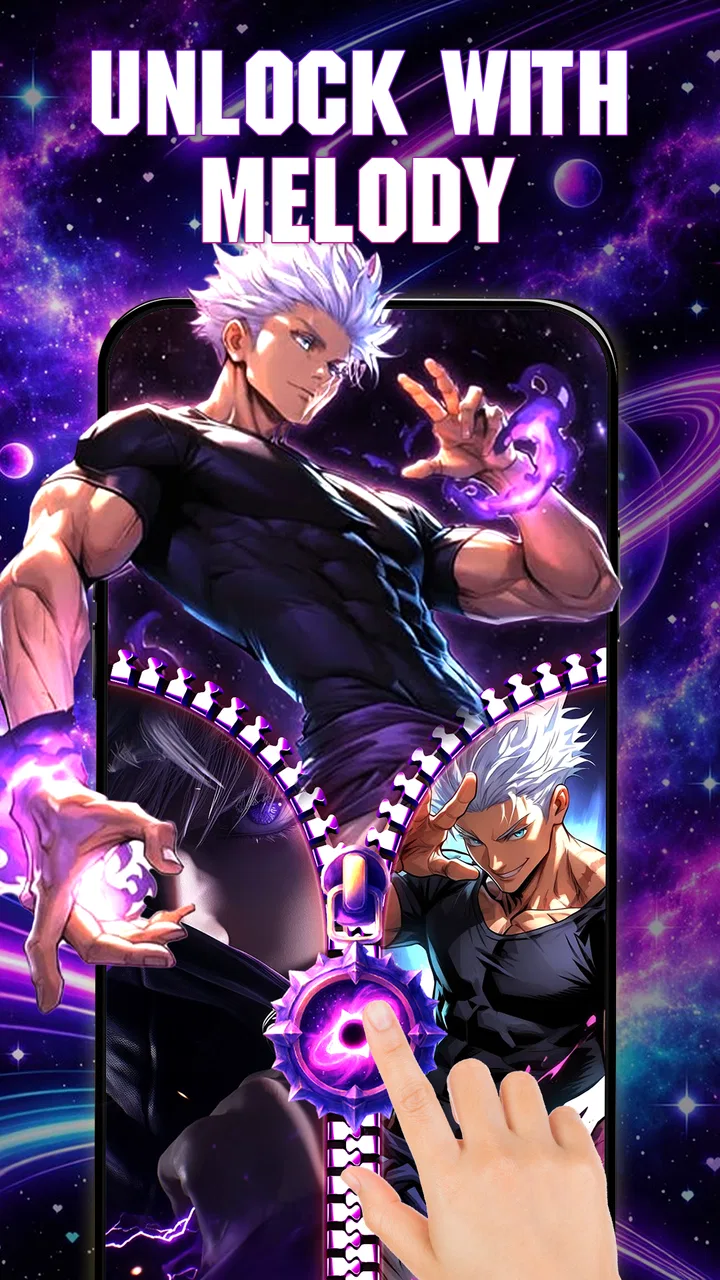
Zipper Lock Screen: Zip Style
- 4.8
- Rating
- 1.00M
- Installs
- Free
- Price
 Analysis by App-foxy
I tried Zipper Lock Screen: Zip Style as a personalization app, and its appeal is easy to understand: it turns the moment of opening your phone into a small visual interaction instead of leaving you with a standard lock screen. The central idea is a zipper-style screen combined with themed visuals and live wallpapers, so the phone feels more personal before I even reach the home screen.
That sounds simple, and it is. This is not an app I would choose for deep system customization, productivity, or security management. I see it as a decorative layer for people who enjoy changing the look and feel of their device. If you want a quick way to give an older phone a different personality, it is more relevant than a conventional wallpaper app. If you prefer the fastest possible unlock with no animation or extra interaction, the zipper effect may feel unnecessary.
What the first launch feels like
The app comes from MGlobal and sits in the personalization category. It is free to use, carries an Everyone age rating, and supports devices running Android 7.0 or later. Those details make it approachable for a wide range of Android users, including people using older hardware that may not support newer customization tools.
You May Also Like

 Blood Strike: 2.5 Anniversary
Blood Strike’s Loadouts Turn Every Drop Into a Tactical Gamble
A close look at Blood Strike’s custom loadouts: how fast access to signature weapons reshapes its battle royale rhythm, rewards preparation, and narrows the gap between fights.

 Pandora - Music & Podcasts
Pandora’s Music Is Easy to Start, but Harder to Recover
Pandora’s strength is its low-effort path from a seed to a station. Its weak spot is how much confidence it asks you to place in connection, setup, and quiet recovery.

 8 Ball Pool
8 Ball Pool Is Built on Rivalries, Rematches, and Routine
A close look at the rivalries, rematches, shared routines, and unanswered safety questions that turn a quick pool match into a persistent mobile community.

 Samsung Music
Samsung Music’s Quiet Strength Is Playing What You Already Own
Its reach comes less from spectacle than from dependable access to a personal library. That simplicity is both the app’s strongest retention engine and its ceiling.

 AccuWeather: Weather Radar
AccuWeather Review: A Quick, Clear Forecast for Everyday Decisions
For everyday plans, the best forecast is the one you can understand quickly. AccuWeather makes rain timing, radar, and local conditions easy to act on, with a few trade-offs.

 Hill Climb Racing
Why Hill Climb Racing Still Turns Crashes Into One More Run
A tiny car, a bumpy hill and one more upgrade: Hill Climb Racing keeps resurfacing because its simple chaos makes every near-miss feel personal.
More From Our News Desk



Its current version is 1.2607.30, and the overall reception is strong, with a 4.7 average from roughly 487 ratings. It has also passed the 100K+ install mark, which suggests that the zipper concept is not limited to a tiny group of theme enthusiasts. I would still treat those numbers as a starting point rather than a guarantee that every device will behave identically, because lock-screen behavior can vary between Android versions and phone manufacturers.
On first opening, I would recommend approaching it as a visual customization tool rather than immediately expecting it to replace every part of your phone’s security system. The store summary focuses on zipper themes and live wallpapers, so the meaningful result is seeing a different lock-screen presentation, not gaining a new password manager or a complete launcher replacement.
The first useful question is simple: do you want the zipper to be the main visual event, or do you mainly want a new background? Those are related but different goals. Someone who likes playful transitions will probably enjoy the interaction itself. Someone who only wants a sharper image behind the clock may find a regular wallpaper selector more direct.
Choosing a theme without making the screen tiring
My advice is to start with a restrained theme rather than the most dramatic option available. A zipper effect already draws attention, and a busy live wallpaper can make the clock, notifications, or other lock-screen information harder to notice. A quieter background lets the zipper remain distinctive without turning every unlock into visual clutter.
This is one of the app’s less obvious trade-offs. A theme can look impressive during setup but become tiring when repeated dozens of times a day. I would judge it after using the phone normally: checking a message, putting the phone down, unlocking it again, and repeating that routine. The best choice is not necessarily the most colorful one; it is the one that stays readable and pleasant during ordinary use.
The path from installation to a first successful result
After installing the app, I would take a deliberate first pass instead of changing several visual choices at once. Open the available zipper themes, select one that matches the kind of background you normally enjoy, and apply it. Then lock the phone and test the result immediately. This confirms whether the effect feels natural on your device before you spend time fine-tuning the appearance.
The first successful action is not simply selecting a theme. It is locking the phone, returning to the lock screen, and seeing the zipper presentation work as expected. That small test matters because a customization can look correct inside an app preview but feel different when used in the real unlock routine. It also gives you a quick chance to decide whether the animation is comfortable or whether a simpler style would suit you better.
For a first-time user, I would repeat that test several times with the phone held in the way I normally use it. Try it while standing, while holding the device in one hand, and when you are in a hurry. A design that looks charming when viewed carefully may be less convenient if the zipper action requires more attention than you want during a quick notification check.
There is a practical workflow here that generic wallpaper apps do not encourage. Instead of choosing a theme and forgetting it, use the first day as a short trial. Keep the same theme through common tasks, then change only the visual style if the interaction itself works for you. This separates a problem with the zipper concept from a problem with a particular theme.
How it fits into everyday phone use
Imagine checking your phone during a commute. You pull it from your pocket to read a notification, and the zipper screen appears before you reach the device. With this app, that transition becomes a small, deliberate gesture. For some people, that extra moment is enjoyable and makes a familiar phone feel less generic. For others, it is one more step between picking up the phone and reading the information they need.
At home, the effect can be more rewarding because you are less rushed. A themed live wallpaper can make a personal device feel coordinated with your favorite colors or general style. It is also a simple way to refresh a phone that has had the same background for months without changing the launcher or rearranging applications.
I think the app is especially suited to users who treat their phone as an accessory. The zipper design offers a visible identity that a static background often cannot provide. It can also be a better fit for someone who likes changing themes occasionally but does not want to learn a complicated customization system.
There is a different consideration for people who unlock their phone constantly. If you open the device many times during work or study, the animation may eventually feel like friction. In that situation, I would choose a subtle theme and keep expectations modest. The app is most successful when the visual interaction feels like a pleasant detail, not an obstacle.
Common confusion during setup and daily use
The biggest source of confusion is likely the difference between a decorative lock-screen experience and the phone’s underlying unlock and security behavior. I would not assume that selecting a zipper theme changes how your device protects access. Keep using the security method you trust on the phone, and think of the zipper presentation as the visual layer you see before reaching the device.
Another common misunderstanding is expecting every live wallpaper to look equally good on every screen. A moving background can compete with text, icons, or notifications, especially when the image has strong contrast across the area where information appears. If the screen feels crowded, switching to a calmer theme is a better first response than concluding that the entire app is unsuitable.
It is also easy to judge the app only from its setup screen. I found that the real decision comes after several ordinary unlocks. The question is not whether the zipper looks attractive once; it is whether the interaction remains comfortable when I am distracted, carrying something, or trying to check the time quickly.
Users of heavily customized Android phones should also keep their expectations realistic. Manufacturer software can handle lock screens in its own way, and a third-party personalization app may not feel identical across all devices. I would test the app soon after installation and make sure the phone still behaves as I expect before relying on the new presentation as part of my daily routine.
Small choices that improve the experience
One useful approach is to match the theme to the way you read the lock screen. If you regularly check the time or notifications without fully unlocking, choose a background with enough quiet space for that information. The zipper is the focal point, but readability should remain the priority. A beautiful background that hides important text is not a successful customization for everyday use.
A second tip is to change one thing at a time. If you switch the theme, wallpaper style, and other visual elements together, it becomes difficult to know what improved or caused annoyance. I would begin with one zipper theme, test it through normal use, and only then experiment with another look. This is faster than repeatedly rebuilding the entire lock screen from scratch.
A third insight is that the app works best as a mood-based refresh rather than a permanent commitment. Use a bright style when you want the phone to feel playful, then move to something calmer when you need a less distracting interface. That mindset makes the free personalization more useful because you are not asking one design to suit every situation.
There is also a good reason to keep an alternative in mind. A standard wallpaper app is better if your priority is a fast, static background with minimal interaction. Your phone maker’s built-in lock-screen settings may be preferable if you want the most predictable behavior and the closest integration with the device. Zipper Lock Screen: Zip Style earns its place when the lock screen itself is part of the visual experience you want to customize.
Who should try it, and who should skip it
I would recommend it to first-time customizers, users with older Android phones, and anyone who enjoys themed visual details. It is also a reasonable choice for someone who wants a free way to make the lock screen feel less ordinary without replacing the rest of the phone’s interface.
I would be more cautious if you need instant access, dislike animations, or prefer a clean screen with no decorative transition. People who want advanced control over every lock-screen element may also outgrow this app quickly. Its strength is the focused zipper concept, not the promise of becoming an all-purpose personalization suite.
It is worth remembering that a high average rating and a growing install base can indicate that the basic idea works well for many people, but personal taste matters more here than with a utility app. A zipper effect is inherently noticeable. If you already know that you prefer understated interfaces, the app may be interesting to look at but not satisfying to keep enabled.
My next step after the first day
Once the first theme works reliably, I would settle on a background that keeps lock-screen information easy to read and use the app for a full day before making a final judgment. Pay attention to three moments: a hurried unlock, a quick time check, and a relaxed moment when you actually notice the design. Those situations reveal whether the zipper is adding character or simply adding delay.
If the result feels good, the next step is not to keep changing everything. Save the style you enjoy mentally or note the visual combination you prefer, then return to it when you want a refresh. If it feels distracting, try a calmer theme before uninstalling. The app’s concept can work very differently depending on how busy the chosen background is.
My overall opinion is favorable, with a clear limit. This is a focused visual makeover, not a complete lock-screen replacement for every kind of Android user. MGlobal has built the experience around a recognizable zipper interaction, and that gives the app more personality than a basic wallpaper picker. The trade-off is that the same personality can become extra effort for people who value speed above style.
For me, the strongest reason to install it is the quick path to a more distinctive phone: choose a theme, apply it, lock the device, and decide from real use. It costs nothing to try, supports a broad range of Android versions, and gives first-time customizers an easy experiment. I would keep it when the zipper feels like a pleasant signature on the phone; I would switch to a conventional wallpaper or built-in lock-screen option when simplicity becomes more valuable than the effect.
FAQs for Zipper Lock Screen: Zip Style
01What is Zipper Lock Screen: Zip Style and how does it work?
Zipper Lock Screen: Zip Style is a personalization app that gives your device a decorative zipper-themed lock screen. After installing it, you can typically choose a zipper design, background, handle style, and related visual effects, then apply the result as a lock-screen theme or wallpaper. The zipper animation is mainly cosmetic and is not intended to replace your phone’s actual security protection.
02Does Zipper Lock Screen: Zip Style provide real phone security?
The zipper animation should not be treated as a secure replacement for Android or iOS authentication. Depending on the device and app version, it may display an imitation lock screen or work alongside the system lock screen, but your real PIN, password, pattern, fingerprint, or Face ID remains the important security layer. Before enabling it, check the app’s permissions and confirm that your normal device lock is still active.
03Can I customize the zipper lock screen and its appearance?
Customization is generally the main reason to install Zipper Lock Screen: Zip Style. During testing, users should look for options such as different zipper designs, colors, backgrounds, text, clock layouts, and animation effects. Available tools can vary by version and device, and some designs may be limited or supported by advertisements. Preview the result before applying it to make sure the style fits your screen.
04Will Zipper Lock Screen: Zip Style affect battery life or phone performance?
A static wallpaper or lightweight lock-screen overlay normally has little effect on performance, but animated zipper effects can use additional battery and system resources. The impact is usually more noticeable on older or lower-end phones, especially if the app runs continuously, displays advertisements, or uses live backgrounds. If you notice battery drain, lag, or repeated notifications, disable animations or remove the app’s background permissions.
05Is Zipper Lock Screen: Zip Style free to download, and does it contain advertisements?
The app may be available as a free download, but free personalization apps commonly include advertising, optional purchases, or premium designs. Ads can appear while selecting themes, opening settings, or applying the lock-screen effect. Before downloading, review the current Google Play or App Store listing for pricing, in-app purchases, supported devices, privacy details, and recent user feedback, since these terms can change with updates.
Pros
- Fun ZIP-style unlocking adds a playful touch to the lock screen.
- Offers multiple zipper designs and customization options.
- Lightweight app with a simple
- beginner-friendly interface.
- Can make an ordinary lock screen feel more personalized.
- Quick to install and easy to enable or disable.]
- contras:[
- May display advertisements
- including during customization.
- Some features or designs may require in-app purchases.
- Lock-screen apps can consume extra battery in the background.
- Compatibility may vary across Android versions and devices.
- It may not provide the same security as the phone’s built-in lock screen.
Cons
- May display advertisements
- including during customization.
- Some features or designs may require in-app purchases.
- Lock-screen apps can consume extra battery in the background.
- Compatibility may vary across Android versions and devices.
- It may not provide the same security as the phone’s built-in lock screen.

Zipper Lock Screen: Zip Style
Gallery